Community
428
learners and families
Karo Africa · the whole school
Your school day, from the first bell to the last payment, held together in one place.
See the working productGood afternoon
Tuesday, 22 September · Term 3
428
learners and families
KES 2.84m
billed this term
KES 1.96m
money in
23
alerts delivered today
184
report cards sent
Fees pipeline
Settled 72
What needs you
3 fee follow-ups
2 approvals waiting
3 attendance notes
Family communication
School day
Tr Cillah Academy
official school thread
21 September · identity protected
Tr Cillah Academy Fee reminder Good afternoon 👋 Outstanding: KES 18,400 Due: 30 September 2026 Reply PAY and we will send you the payment link.
01 · One school, one current view
This is Tr Cillah Academy’s real Karo menu. The numbers show work waiting for the right person; the areas follow the way a school actually runs.

Community · where school meets home
Fees, statements, attendance, learning and school-day updates arrive in one private WhatsApp thread. A parent can ask for what they need, in words they already use.
The school reaches the family where the family already is.
Messages stay connected instead of spreading across class groups and paper slips.
The parent chooses their language for the thread.
The school sees what was accepted, delivered, read or failed.
This protected school-day view uses Karo’s current approved English templates and live message shapes. Family identity, account details and links have been removed.
Tr Cillah Academy
official school thread
21 September · identity protected
Good morning 👋 Your child checked out of Tr Cillah Academy at 3:20 pm and is on the way home 🚌
typing…
Real school screen · Community

See every inquiry and application, and whether the family came through a Facebook link, gate poster, walk-in or referral, so the school can follow up.
See enrolled learners by class, so places and class sizes can be planned from a current list.
Keep alumni who completed and see how many can still be reached, so the school community does not end at the gate.
See every guardian on WhatsApp and what the school sent, so missed or failed communication can be handled.
Compare class numbers at a glance, then open the class that needs attention.
See where families are in the journey and move the next application forward.
02 · Fees & finance
The bursar sees fees and the finance office sees the whole set of books. Every payment keeps its learner, invoice and term attached.
Invoice a class, receive mobile money or card payments, issue receipts and follow the balance without rebuilding a spreadsheet.
Keep fee income as one clear figure beside budgets, expenses, journals, bank reconciliation and the accounts the school reports from.
Keep school-funded support separate from sponsor-funded payments, with approval and a visible history.
Families can pay using mobile money, card or bank transfer.
Real school screen · Fees

See what the school invoiced, so the term starts from one agreed figure.
See money already moving through payment channels, so expected receipts are not mistaken for unpaid fees.
See what has cleared and issue the right receipt against the learner and invoice.
See balances that need a private follow-up, then contact the right guardian on WhatsApp.
Compare each week’s collections with what was billed and act before a shortfall grows.
Move issued, part-paid, overdue and void invoices through the correct next step.
Real school screen · Finance

Bring income from every source into one view, with fees counted once and kept in context.
See confirmed receivables and follow the records behind them.
See spending and liabilities before approving the next commitment.
Read the school’s current position from money in, money out and what remains due.
Compare each budget line with actual spending, then protect the areas running tight.
Match records to the bank and use the money colours to distinguish received, expected, committed and due.
03 · Academics
Teachers work from the curriculum the school follows. Leaders can see whether teaching, attendance and assessment are moving together.
Build the curriculum tree, schemes of work, lesson plans, records of work and a timetable that respects teachers and rooms.
Share assignments, take attendance and keep the class record current while the school day is still happening.
Use the school’s own grading and weighted term composition, then review before report cards reach guardians.
Real school screen · Academics

See assignments, plans and assessment work arriving, so nothing waits unseen.
See attendance and teaching records while the school day is happening.
See what has passed review and reached the official learner record.
See which academic updates reached families and follow any failed delivery.
Understand how learners are spread across grades without opening every report.
Compare current and earlier results, then investigate a class or subject that moved.
04 · Wellbeing & safety
The right people see the whole learner, not scattered notes. Sensitive concerns stay inside the school’s safeguarding process.
Keep visits, care, health profiles and counselling follow-up together, with access recorded.
Know what a guardian has agreed to and who is authorised to collect a learner before anyone leaves.
Record a concern against a named safeguarding lead and reason. Guardian contact is a deliberate school decision, never automatic.
Real school screen · Wellbeing & safety

See how much care and safety work was recorded, so concerns do not stay in private notebooks.
See what still needs the right person’s attention and follow it through.
Confirm completed care work has an outcome and a record.
See the areas creating demand, from the sick bay to facilities, and place support there.
Check visitors, pickup, passes and care activity from one accountable record.
Open these only with named permission; the dashboard never exposes their content.
05 · Operations
The office, gate, transport team and boarding staff work from the same current picture, so handovers do not depend on memory.
Clear visitors and early pickups, sign learners onto each bus leg and keep every arrival and departure on record.
Run boarding, library, facilities, events, compliance dates and the timetable without separate notebooks.
Move the school into its next term or year from one place, carrying the records that should continue and closing what should not.
Real school screen · Operations

See transport, gate, library and campus work that must run today.
Know who is in school and which movements are recorded before the next handover.
See events, facilities work and term changes early enough to prepare.
Send the right operational update and see whether it reached each family.
06 · People
Recruitment, time, leave, performance and pay stay connected to the person they belong to and the role they actually hold.
Publish vacancies, move applicants through recruitment, keep staff records and confirm daily clock-in and clock-out.
Route leave to the right approver, arrange class cover and keep appraisal and development evidence together.
Prepare payroll and statutory records, approve the run and deliver each payslip privately by email with a delivery record.
Real school screen · Human Resources

See vacancies, applicants and offers, then move the right candidate to the next step.
See staff by role and employment category from the school’s current record.
See contracts, leave and payroll work that needs approval before it becomes a problem.
Let staff confirm attendance from an approved school location.
Record an authorised exception with a reason, rather than losing the day’s attendance.
07 · Procurement, reports & admin
Leadership can follow a request from need to payment, understand the school through reports and decide who can do what.
Move requests through quotations, approval, purchase, receipt and payment, while assets keep their own history.
Read each school area in one consistent view, export what the board needs and prepare the monthly pack from current records.
Set roles before forms appear, control publishing and assessment choices, manage branches and keep changes auditable.
Real school screen · Procurement
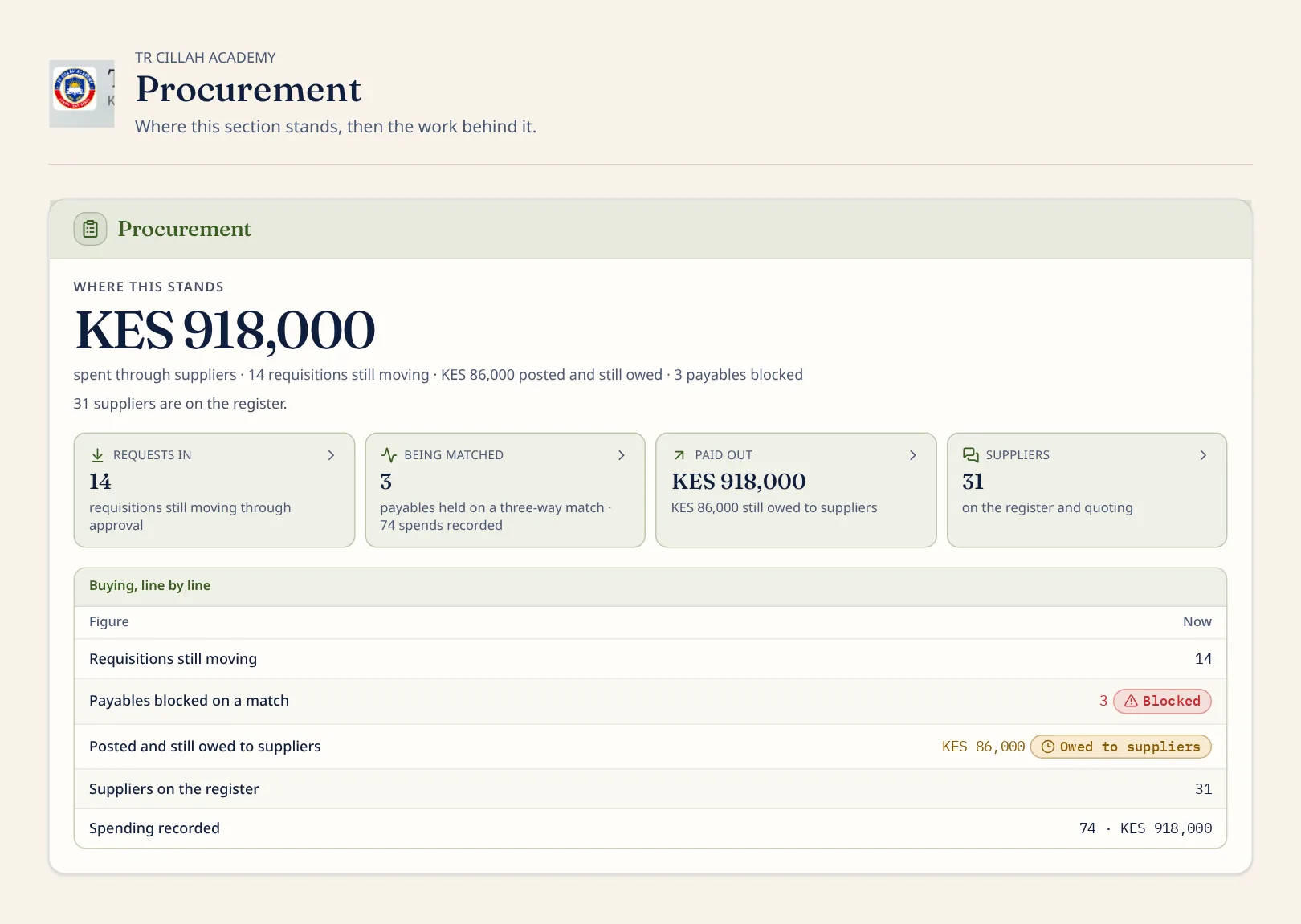
See what staff have asked the school to buy and route it for approval.
Compare quotations and match delivery, invoice and order before money leaves.
See completed supplier payments with the purchase record still attached.
Know who supplies the school, what is owed and which record needs attention.
Follow every requested item through approval, receipt and payment instead of approving only a total.
Real school screen · Reports

See what has been added across the school and prepare the report that needs it.
Keep completed periods available without mixing them into today’s work.
See the documents the school formally released and verify their status.
Keep an audit trail of access to issued records, so sharing stays accountable.
Real school screen · Admin

Invite the right person into the right school role, then see what still waits for acceptance.
Complete the school’s rules and settings before the related forms appear.
See administrative changes and activity, so responsibility does not disappear.
Two sides of one school day
Ada bila aibu.
A parent can see what is due, pay privately, keep the receipt and ask for help without a queue or an embarrassing public chase.
Shule shwari.
The school sees the work, the money and the people that need attention, then acts from the same current record.
One price · every school area
KES 299
per student, per term · no setup fee
Every area on this page is included. Groups, colleges and universities can shape a rollout with the team.
Get the app
Install Karo straight from this page, no download queue, no updates to chase. It opens full-screen from your home screen, on Android and iPhone, and on your laptop too. Native Android and iOS bundles are also configured and ready to build for the Play Store and App Store.